
왜 엔진을 직접 만들었나
텍스트 추출이 문서를 둘로 가르는 문제와, 하나의 문서 모델로 여는 설계 배경.
원문: docs/WHY.md · 이 페이지는 빌드할 때 그 파일에서 생성됩니다.
README에서 옮겨 온 설계 배경 문서입니다. 한국어 뒤에 English가 이어집니다. 실행 가이드는 EMBED-GUIDE·CLI-GUIDE·INTENT-SCHEMA, 기여 규칙은 CONTRIBUTING.md를 보세요.
텍스트 추출은 문서를 둘로 가른다
LLM에게 한글 문서를 주는 기존 방법은 결국 텍스트 추출입니다. 추출은 됩니다 — 그런데 그 순간 문서가 둘로 갈라집니다. AI가 읽은 것(평문)과 사람이 보는 것(조판된 지면)이 서로 다른 표현이라, AI는 "3번 표의 빈칸"이 화면 어디인지 모르고, 고친 결과가 레이아웃을 깨뜨렸는지 아무도 보증하지 못합니다. 서식 자체가 내용인 공문서·신청서에서 이 간극은 치명적입니다.
그래서 파서도 뷰어도 아닌 엔진을 소유합니다. 열기부터 저장까지 하나의 문서 모델 위에서 돕니다:
.hwp / .hwpx ──▶ 문서 모델 ──▶ 조판 ──▶ 페이지 SVG (화면 · 좌표 질의)
                    │                 ├▶ PDF (레이아웃 보존)
                    │                 └▶ 문서 프로필 · Markdown (AI가 읽는 창)
                    └── 편집 명령 ──▶ 문서 변경 (되돌리기 포함) ──▶ HWPX 저장
여기서 세 가지가 따라 나옵니다.
- AI가 읽는 것 = 화면에 그려지는 것 — 프로필의 주소
[s0/b3]은 화면의 그 블록과 같은 좌표라, 마킹 없이 "첫 번째 표에 행 추가해줘"가 정확한 블록에 꽂힙니다. - 편집은 화이트리스트 명령만 — 모델은 자유 텍스트가 아니라 검증된 편집 명령만 낼 수 있습니다.
- 결과를 수치로 검증 — 쪽수·줄바꿈 일치율이 게이트로 잠겨 있습니다 (정확도와 한계).
화면은 당신이 조립한다
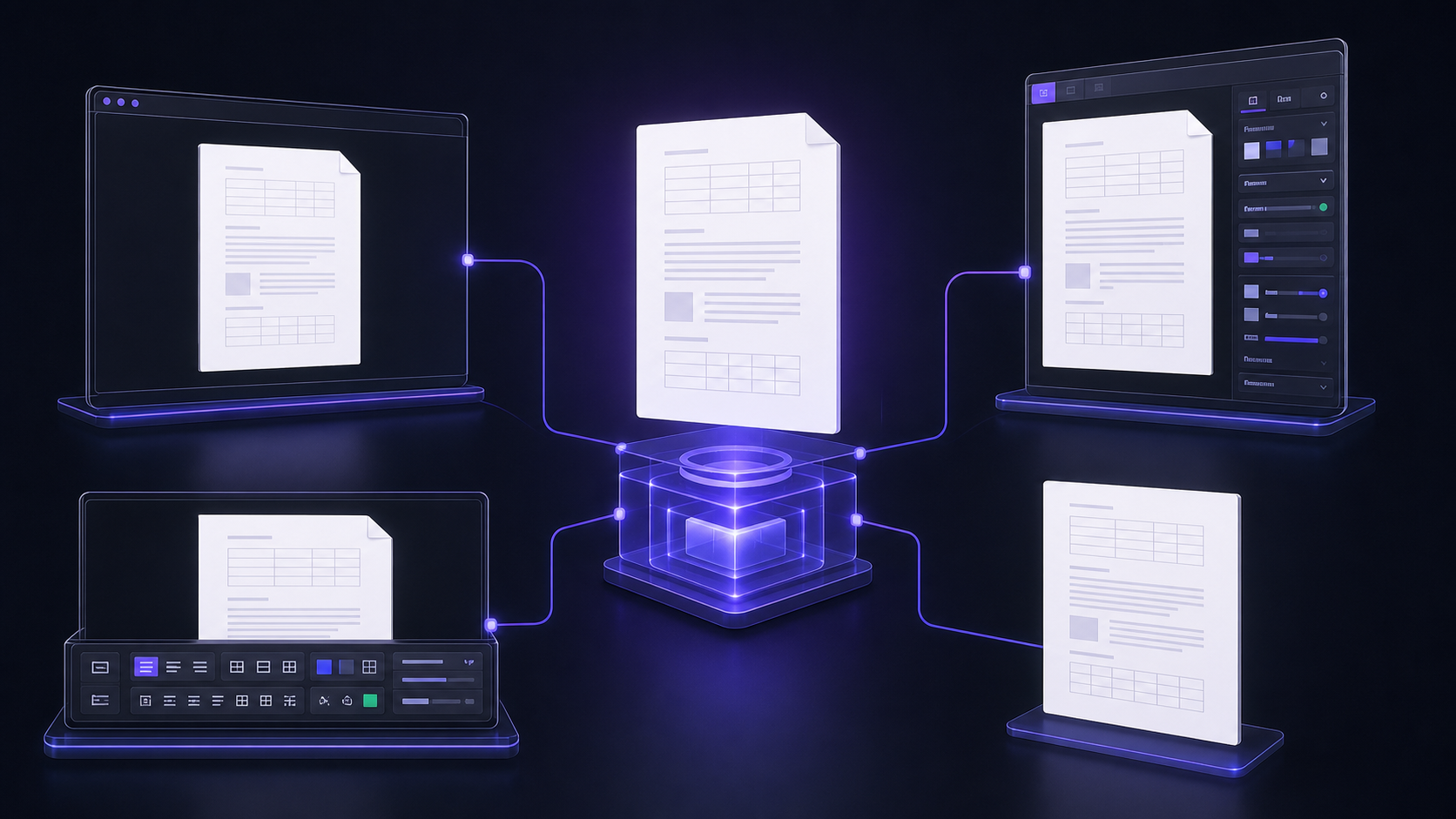
문서 엔진은 하나, 제품 셸은 자유롭게 — 기본 UI를 바로 쓰거나 필요한 부분만 가져갑니다.
이 저장소가 배포하는 것은 엔진과 SDK입니다. 데모는 그 엔진으로 만든 참조 구현이지 여러분이 써야 할
화면이 아닙니다. 참조 에디터 <HwpWorkspace/>도 문서 표면만 소유합니다 — 페이지·선택·오버레이·수동
편집. 오른쪽 패널은 슬롯이라 채팅을 넣든, 입력 폼을 넣든, 인스펙터를 넣든, 아무것도 안 넣든 호스트
마음입니다. workspacePanel()은 바이브 편집+디자인 인스펙터가 담긴 기본 UI이고 배치만
"rail"(기본)·"bottom"·"modal"·"unstyled" 중에서 고릅니다. 더 자유롭게는 WorkspacePanelFrame
안에 자기 폼을 넣거나, 슬롯에서 React portal을 반환해 워크스페이스 밖 어느 DOM에든 마운트할 수 있습니다.
즉 엔진 → 헤드리스 editor-core → 문서 표면 → 선택형 기본 셸을 필요한 깊이까지만 가져갑니다.
(배치·portal·tab/open 제어 레시피는 EMBED-GUIDE §3.1.)
슬롯이 호스트에게 넘기는 값
(WorkspaceSidePanel) 전부:
| 값 | 무엇 |
|---|---|
canEdit | 문서가 열려 있고 편집 가능한가 (false면 입력을 잠그면 됩니다) |
anchors | 사용자가 지금 지정한 위치들 — 문서 컨텍스트와 같은 [s/b] 주소 |
modLabel | 플랫폼 보조키 표기(⌘ / Ctrl) |
removeAnchor(i) | 지정한 위치 하나 제거 |
clearAnchors() | 지정 위치 전체 해제 |
docContext | AI에 넘길 문서 컨텍스트(문서 프로필 + 지정 위치 + 표 그리드) |
apply(intents) | 검증된 편집 명령을 적용하고 반영된 개수를 돌려준다 |
jumpToPage(p) | 해당 쪽으로 스크롤(0부터) |
revealTarget(s, b) | 해당 블록으로 스크롤 + 깜빡임 ("위치 보기") |
focusToken | 호스트가 입력창에 포커스를 줘야 할 때 값이 증가 |
previewCards(intents) | 적용 전 미리보기용으로 제안을 보강(예: 삭제 대상의 원문) |
revert() | 마지막에 적용한 묶음을 한 단위로 되돌린다 |
undoDepth() | 현재 되돌리기 스택 깊이 |
designSelection | 현재 단일 선택의 종류·텍스트·쪽·X/Y/W/H·글자 서식 |
applyDesign(patch) | 선택 영역에 서식 변경분만 적용 |
designFonts | 호스트 인스펙터가 보여 줄 수 있는 폰트 목록 |
textEditing | 엔진 캐럿이 텍스트 입력을 소유한 상태 |
참조 패널을 그대로 쓰고 싶다면 workspacePanel({ onAiRequest }) 한 줄이면 됩니다
(packages/react/src/chatSlot.tsx) — 다만 그 한국어 문구와
카드 레이아웃은 데모의 것이지 제품 계약이 아닙니다. 실제 제품은 자기 패널을 그리는 쪽을 권합니다.
설계 노트 — XML+CSS에서 IR+Intent로
초기 기획은 "HWP → XML(구조) + CSS(디자인) → LLM이 어느 쪽을 고칠지 선택"이었습니다. 구현하며
포맷 중립 IR(SemanticDoc) + 타입드 Intent 편집으로 피벗했습니다
(PIVOT-DESIGN.md — 역사 문서):
- 렌더 정본은 SemanticDoc → 조판 → SVG(HWP 원본과 픽셀 수준 대조 가능)
- 편집 정본은 Intent JSON → Op → IR 변이(LLM 출력을 스키마로 잠금 — 자유 XML/CSS 패치보다 검증 가능하고 undo가 정확함)
- XML+CSS 상은
hwp-jsx선택 코덱(JSX/CSS 투영·round-trip 검증됨)으로 남아 있으며, HTML export가 그 계보입니다
Rust 크레이트: hwp-model(IR) · hwp-hwpx(HWPX 코덱) ·
hwp-rhwp(.hwp 파싱 부트스트랩, rhwp MIT) ·
hwp-typeset(조판: 금칙·장평·자간·옛한글) · hwp-render(PaintOp→SVG) · hwp-export(PDF/HTML) ·
hwp-ops(op-bus·undo) · hwp-mcp(Intent 스키마) · hwp-session(지오메트리) · hwp-wasm(바인딩) ·
hwp-crypto(배포용 문서 복호) · auto-hwp-cli(CLI)
로컬 빌드
엔진을 직접 고칠 때만 필요합니다 — 그냥 써볼 거라면 라이브 데모로 충분합니다.
git clone --recurse-submodules https://github.com/kwakseongjae/auto-hwp
cd auto-hwp

# 엔진 wasm 빌드 (Rust + wasm-bindgen 필요 — CONTRIBUTING.md 참고)
cargo build -p hwp-wasm --profile wasm-size --target wasm32-unknown-unknown
wasm-bindgen --target web --out-dir packages/engine/pkg target/wasm32-unknown-unknown/wasm-size/hwp_wasm.wasm

# 데모 앱
cd apps/hwp-lab && npm install && npm run dev   # http://localhost:3000
AI 편집을 로컬에서 켜려면 apps/hwp-lab/.env.local에 OPENROUTER_API_KEY를 넣으세요
(키는 서버 라우트에만 존재 — 클라이언트 번들에 절대 실리지 않습니다).
검증 스위트·불변식·기여 규칙은 CONTRIBUTING.md와 AGENTS.md.
English
Text extraction splits the document in two
The existing way to feed a Korean document to an LLM is text extraction. It works — and at that moment the document splits in two: what the AI read (plain text) and what a human sees (the typeset page) are different representations. So the AI cannot tell where "the blank cell in table 3" is on screen, and nobody can guarantee its edit didn't break the layout. For government forms and applications — where the layout is the content — that gap is fatal.
So we own the engine, not a parser and not a viewer. Open through save all run on one document model:
.hwp / .hwpx ──▶ document model ──▶ typeset ──▶ SVG pages (screen · geometry queries)
                      │                      ├▶ PDF (layout-preserving)
                      │                      └▶ doc profile · Markdown (what the AI reads)
                      └── edit commands ──▶ document mutation (with undo) ──▶ HWPX save
Three things follow.
- What the AI reads = what gets drawn — a profile address like
[s0/b3]is the same coordinate as that block on screen, so "add a row to the first table" lands on the right block with nothing marked. - Edits are whitelisted commands only — the model emits validated edit commands, never free-form patches.
- Results are verified in numbers — page count and line-break match rates are locked as gates (Accuracy and limits).
You assemble the UI
What this repo ships is an engine and an SDK. The demos are a reference implementation built on
it, not the UI you are supposed to adopt. Even the reference editor <HwpWorkspace/> owns only the
document surface — pages, selection, overlays, manual editing. The right-hand panel is a slot:
put a chat in it, a form, an inspector, or nothing at all. workspacePanel() is our default UI (vibe
editing plus a design inspector) and you only pick the placement: "rail" (default), "bottom",
"modal" or "unstyled". To compose more freely, put your own form inside WorkspacePanelFrame, or
return a React portal from the slot to mount the panel on any DOM node outside the workspace. In
short: engine → headless editor-core → document surface → optional default shell, taken only as
deep as you need. (Placement, portal and controlled tab/open recipes:
EMBED-GUIDE §3.1.)
Everything the slot hands the host
(WorkspaceSidePanel):
| Value | What it is |
|---|---|
canEdit | A document is open and editable (false → disable composing) |
anchors | The positions the user has marked — the same [s/b] addresses the doc context uses |
modLabel | Platform modifier caption (⌘ / Ctrl) |
removeAnchor(i) | Drop one marked position |
clearAnchors() | Clear the whole selection |
docContext | Document context for the AI bridge (doc profile + marked positions + table grids) |
apply(intents) | Apply validated edit commands; resolves with how many landed |
jumpToPage(p) | Scroll to a page (0-based) |
revealTarget(s, b) | Scroll to a block and flash it (the "reveal target" affordance) |
focusToken | Bumps when the host should focus its composer |
previewCards(intents) | Enrich proposals for preview (e.g. a delete card showing the original text) |
revert() | Revert the last applied batch as one unit |
undoDepth() | Current undo-stack depth |
designSelection | Kind, text, page, X/Y/W/H and character format of the current single selection |
applyDesign(patch) | Apply only the format delta to the selection |
designFonts | The font list a host inspector may offer |
textEditing | The engine caret currently owns text input |
If you do want our reference panel, workspacePanel({ onAiRequest }) mounts it in one line
(packages/react/src/chatSlot.tsx) — but its Korean copy and
card layout are a demo affordance, not a product contract. Real products should render their own
panel.
Design note — from XML+CSS to IR+Intent
The original plan was "HWP → XML (structure) + CSS (design) → the LLM picks which side to edit".
During implementation this pivoted to a format-neutral IR (SemanticDoc) + typed Intent edits
(PIVOT-DESIGN.md — a historical document):
- the render truth is SemanticDoc → typeset → SVG (comparable pixel-for-pixel with Hancom)
- the edit truth is Intent JSON → Op → IR mutation (schema-locked LLM output — more verifiable than free-form XML/CSS patches, with exact undo)
- the XML+CSS view survives as the optional
hwp-jsxcodec (JSX/CSS projection, round-trip-verified); HTML export descends from it
Rust crates: hwp-model (IR) · hwp-hwpx (HWPX codec) · hwp-rhwp (.hwp parse bootstrap,
rhwp MIT) · hwp-typeset (kinsoku · width/letter spacing ·
old Hangul) · hwp-render (PaintOp→SVG) · hwp-export (PDF/HTML) · hwp-ops (op-bus · undo) ·
hwp-mcp (Intent schema) · hwp-session (geometry) · hwp-wasm (bindings) · hwp-crypto
(distribution-copy decryption) · auto-hwp-cli (CLI)
Local build
Only needed if you are changing the engine — to just try it, the live demo is enough.
git clone --recurse-submodules https://github.com/kwakseongjae/auto-hwp
cd auto-hwp

# build the engine wasm (Rust + wasm-bindgen — see CONTRIBUTING.md)
cargo build -p hwp-wasm --profile wasm-size --target wasm32-unknown-unknown
wasm-bindgen --target web --out-dir packages/engine/pkg target/wasm32-unknown-unknown/wasm-size/hwp_wasm.wasm

# demo app
cd apps/hwp-lab && npm install && npm run dev   # http://localhost:3000
To enable AI editing locally, put OPENROUTER_API_KEY in apps/hwp-lab/.env.local — the key lives
only in the server route and never reaches the client bundle. The verification suite, invariants and
contribution rules are in CONTRIBUTING.md and AGENTS.md.